

ChatGPT & AI in Software Development 2026: How to Use It Effectively



AI has become a central part of modern software development, supporting engineers in coding, testing, and debugging. This article shows how to effectively integrate AI tools into everyday development workflows.
The use of artificial intelligence in software development has changed dramatically in recent years. While AI tools were once primarily used for generating text, they are now an integral part of modern engineering processes.
Whether it’s code generation, refactoring, documentation, testing, or debugging, tools like ChatGPT, GitHub Copilot, and Claude are now daily companions for developers.
In this article, you’ll learn how to use AI effectively in software projects, which best practices have proven successful, and what you should pay close attention to.
What is ChatGPT?
ChatGPT is an AI assistant developed by OpenAI, based on so-called Large Language Models (LLMs). These models are trained on massive amounts of text, documentation, and source code.
This allows ChatGPT to:
- Generate code
- Analyze errors
- Write documentation
- Create tests
- Explain APIs
- Suggest architecture ideas
- Propose refactorings
- Generate CI/CD configurations
Unlike traditional search engines, ChatGPT does not simply provide links – it delivers concrete solutions and suggestions.
However, it is important to understand that AI does not replace developers. Instead, it helps them become more productive.
With ChatGPT, you can integrate this powerful tool directly into your development workflow. But be careful: ChatGPT is not a universal solution and should be used thoughtfully. What you need to watch out for is explained below.
How can ChatGPT be used in software development?
1. Develop code, scripts and snippets
ChatGPT can help developers generate code, scripts and snippets automatically by typing short prompts. This can save time and effort. However, it is important to ensure that the generated code meets the requirements and is thoroughly tested before deploying it. ChatGPT can also act as a “code checker” and suggest improvements.
In addition, ChatGPT can help with writing automated CI/CD pipelines. Overall, ChatGPT provides tremendous support for code development, but it is important to still have the skills and knowledge to write and optimize code from scratch.
I prefer to use it when generating config files. There, many parameters are needed that are rarely used and therefore you don’t have them in your head. Recently I wanted to extend an existing CI/CD environment with a test phase. The existing script looked like this:
name: Node.js CI/CD Workflow with frontend

on:
  push:
    branches: [ "master" ]

jobs:
  test-and-build:

    runs-on: ubuntu-latest

    strategy:
      matrix:
        node-version: [16.x]

    steps:
    - uses: actions/checkout@v3

    - name: Use Node.js ${{ matrix.node-version }}
      uses: actions/setup-node@v3
      with:
        node-version: ${{ matrix.node-version }}
        cache: 'npm'

    - name: Build Frontend
      run: npm i --prefix client && npm run build --prefix client
      env:
       CI: false

    - name: Push to build branch
      uses: s0/git-publish-subdir-action@develop
      env:
        REPO: self
        BRANCH: build # The branch name where you want to push the assets
        FOLDER: ./public # The directory where your assets are generated
        GITHUB_TOKEN: ${{ secrets.GITHUB_TOKEN }} # GitHub will automatically add this - you don't need to bother getting a token
        MESSAGE: "Build: ({sha}) {msg}" # The commit message
ChatGPT then reengineered the missing step for me. I simply passed the existing config file in the prompt.
[...]
    - name: Install dependencies and run tests
      run: |
        npm install
        npm run test
      env:
        CI: true # set environment variable to run tests in CI mode
[...]
2. Writing documentation
By simply asking ChatGPT for the documentation you want, you can have it generate structured documentation that covers all the important aspects of your code or project. Extensions for your IDE can also help with this. I will go into this in more detail later.
However, it is important to ensure that the generated documentation is complete and understandable. One should also take the time to review it and edit it if necessary before passing it on to customers or users.
I have a great example of this here. Imagine you are looking at another developer’s code and he didn’t pay attention to the naming of the functions and also didn’t create comments. By the time you look through the code, ChatGPT already has the solution for you. Or can you tell me within 10 seconds what this code does?
import random

def whatDoesThisFunction(numbers):
    for i in range(len(numbers)):
        for j in range(i+1, len(numbers)):
            if numbers[j] < numbers[i]:
                numbers[i], numbers[j] = numbers[j], numbers[i]
    return numbers

if __name__ == '__main__':
    numbers = [random.randint(1, 100) for _ in range(10)]
    sorted_numbers = whatDoesThisFunction(numbers)
    print(sorted_numbers)
I asked ChatGPT to “Write comments in the code:”. This was the result:
import random  # Import the random module

def whatDoesThisFunction(numbers):
    """
    This function takes in a list of numbers and sorts them using the bubble sort algorithm.
    """
    for i in range(len(numbers)):
        for j in range(i+1, len(numbers)):
            if numbers[j] < numbers[i]:
                numbers[i], numbers[j] = numbers[j], numbers[i]  # Swap the values if the jth element is smaller than the ith element.
    return numbers

if __name__ == '__main__':
    numbers = [random.randint(1, 100) for _ in range(10)]  # Generate a list of 10 random integers between 1 and 100.
    sorted_numbers = whatDoesThisFunction(numbers)  # Call the function to sort the numbers.
    print(sorted_numbers)  # Print the sorted list of numbers.
I think I do not need to say more 🙂
3. Provide food for thought
It can be frustrating to be stuck trying to solve a problem and run out of ideas. In such situations, ChatGPT can serve as a thought-provoking tool by suggesting alternative approaches and ideas. With its ability to analyze a wide range of information and recognize patterns, ChatGPT can often make unexpected and useful suggestions. While it may not always provide the perfect solution, it can help stimulate the creative process and find new ways to solve problems.
4. Test writing
When it comes to writing tests, it can be very time-consuming and tedious. But with ChatGPT you can automate this tedious task and speed up your code development process.
How does it work? By simply submitting a request to ChatGPT describing the test case you want to create. The AI engine will then automatically generate the test case code for you! This means less stress and faster code generation, so you can focus on other important tasks.
I would like to demonstrate the whole thing to you. I have here code from a middleware of an existing Rest API:
// Middleware to validate challenge parameters
validateChallenge: (req, res, next) => {
  // Check if request body, challengeID, done and code are present and have expected data types
  if (
    !req.body ||
    !req.body.challengeID ||
    !req.body.code ||
    !req.body.done
  ) {
    return res.status(400).send({
      msg: 'Please enter valid challenge params!', // Send error message if validation fails
    });
  }
  next(); // Call next middleware function if validation passes
},
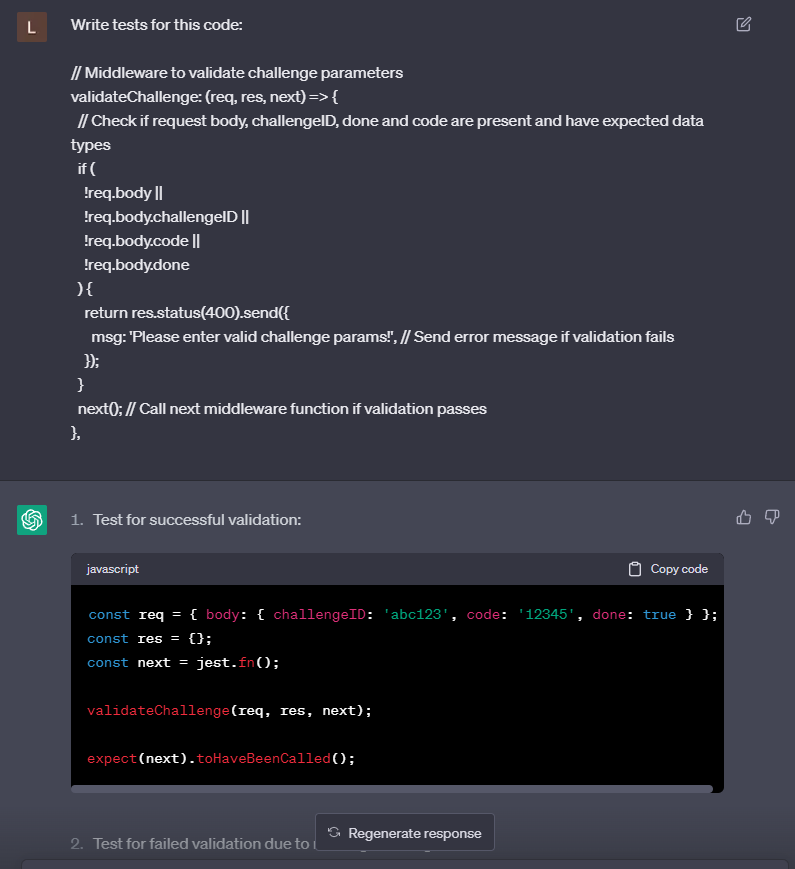
Now we take this code and pass it to ChatGPT with the following prompt: “Write tests for this code: CODE“.
With a single click, ChatGPT spits out a total of 5 test cases for our code.
If you already have other tests in your project you can of course tell ChatGPT to generate unit tests for a specific framework.
Overall, ChatGPT can help you work more efficiently and simplify the test writing process. So why not outsource this tedious task to an AI and optimize your development time?
Best Practices for using ChatGPT in Software Development
After using ChatGPT for quite a while now in my daily developer existence, I was able to find some tips & tricks when using ChatGPT.
1. Choose prompts correctly
To get good results you have to tell ChatGPT exactly what you want. Write 1-2 sentences more in the prompt, but you will usually get better results.
2. The correct IDE extensions
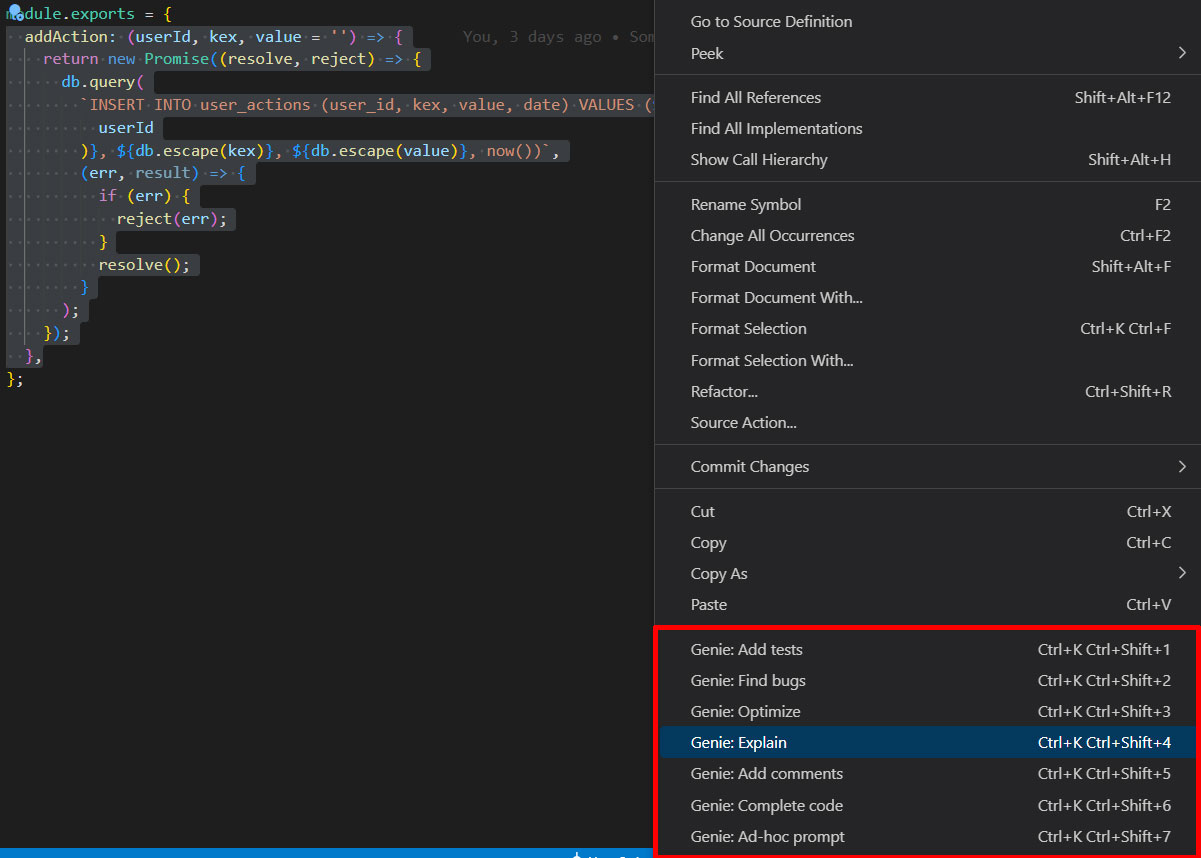
There are now numerous extensions available for all IDEs in marketplaces and stores. Just browse the stores. Since I personally use Visual Studio Code, I can only recommend the Genie extension for it.
3. Watch out for sensitive/secret data
Developers often deal with sensitive data, such as user information or secret company data. As a developer, it is therefore crucial to ensure that this data is not accidentally exposed when working with ChatGPT.
The best practice here is to provide only test data to ChatGPT. By making sure that no confidential information is used, you prevent accidental data leaks and keep your data safe.
4. ChatGPT works better with examples
Giving examples is an important step to improve the performance of ChatGPT. For example, if you ask ChatGPT to generate SQL queries or code, you will get better results if you provide concrete examples.
By providing a few lines of SQL code or the structure of the table, ChatGPT can better understand what you need and can provide more accurate results. Similarly, if you want ChatGPT to comment code. By providing sample comments, ChatGPT can better understand what you need and can generate more accurate comments.
5. Use English language
My native language is German, so it is easier for me to create German prompts. However, I have noticed that ChatGPT understands English prompts better and therefore gives better results. Pretty much all developer resources and documentation are in English, so ChatGPT naturally understands that better.
Where AI Still Has Limitations
Despite its rapid progress, AI still has clear limitations. In complex system architectures or heavily evolved legacy codebases, it quickly reaches its boundaries. While it can recognize patterns and suggest improvements, it rarely understands the deeper domain-specific context of a project.
The same applies to highly domain-specific business logic. AI often lacks the implicit knowledge of why certain decisions were made historically or which business rules apply behind the scenes. It can also be unreliable when it comes to performance optimization or security-critical code, as suggestions may appear plausible but are not always robust or optimal in practice.
In general, AI is strong at accelerating development and providing input, but it cannot take responsibility for architectural decisions or production-ready quality.
Summary
The role of AI in software development has fundamentally changed. It is no longer an experimental add-on but a core component of modern development workflows.
When used correctly, AI helps developers build faster, reduce repetitive tasks, create tests and documentation more efficiently, and identify issues in code more quickly. At the same time, the focus of software engineering is shifting – away from pure code writing and toward architecture, evaluation, and the effective orchestration of AI-driven workflows. What matters most is not whether AI is used, but how it is used. Developers who learn to formulate precise requirements, critically evaluate outputs, and integrate AI thoughtfully into their workflows will become significantly more productive in the long run.
AI does not replace developers. But it is fundamentally changing how modern software development works – and which skills truly matter.
-
Pingback: TOP 20 VSCode Extensions to increase your productivity!
-
Pingback: Artificial Intelligence: Ready for the AI Revolution?
-
Pingback: Artificial Intelligence: Ready for the AI Revolution?
-
Pingback: CI/CD in Plesk: Deploy Node.js, React, Angular, Vue & Co. automatically